
Introduction
Laravel 13 is here, bringing new improvements focused on developer experience, modern PHP standards, AI tooling, and smoother application upgrades. If your application is currently running on Laravel 12, upgrading to Laravel 13 is generally straightforward, but following a proper upgrade process is important to avoid dependency conflicts, breaking changes, and deployment surprises.
Laravel continues its tradition of providing incremental and developer-friendly upgrades, making it easier for teams to stay on the latest framework version without major rewrites.
In Laravel 13, developers can expect updates such as:
- PHP 8.3+ support
- Laravel Boost AI-assisted upgrade workflow
- Laravel AI SDK ecosystem improvements
- Modern PHP attribute support
- Dependency and performance enhancements
- Cleaner developer tooling
In this guide, we’ll walk through how to upgrade from Laravel 12 to Laravel 13 step by step using multiple approaches, including:
- Checking upgrade compatibility with Laravel Shift
- Upgrading using Laravel Boost (recommended)
- Performing a manual upgrade
- Reviewing breaking changes
- Running cache and optimization commands
- Deployment
- Verify laravel version
Whether you're upgrading a small Laravel application, an API backend, or a large production system, this tutorial will help you complete the migration confidently.
What's New in Laravel 13
Laravel 13 introduces several improvements focused on developer productivity, modern PHP practices, queue management, caching, and AI tooling. Here are some notable updates developers should know before upgrading.
1. PHP 8.3+ Requirement
Laravel 13 now requires PHP 8.3 or higher. This allows the framework to take advantage of the latest PHP language improvements, better performance optimizations, and modern development capabilities.
Before upgrading, make sure your local and production environments are running a compatible PHP version.
2. Laravel Boost Upgrade Workflow
Laravel 13 promotes the use of Laravel Boost, an AI-assisted upgrade workflow that helps simplify framework upgrades. It can assist developers with dependency updates, code adjustments, and upgrade guidance.
This approach can significantly reduce manual work when moving between Laravel versions.
3. Laravel AI Ecosystem Improvements
Laravel continues expanding its support for AI-powered application development. The ecosystem is becoming more friendly toward integrations involving OpenAI, Gemini, Claude, and other AI services.
For teams building AI-enabled applications, Laravel 13 offers a stronger foundation and improved developer tooling.
4. Centralized Queue Routing with Queue::route()
Laravel 13 introduces Queue::route(), allowing developers to configure queue connections and queue names for job classes from a single location.
Instead of repeating queue configuration across dispatch calls, you can manage routing centrally, resulting in cleaner and more maintainable queue setups.
5. Failover Queue Driver
Laravel 13 adds a Failover Queue Driver for better reliability. If the primary queue connection becomes unavailable, Laravel can automatically fall back to another configured connection.
This feature is especially valuable for production environments and high-availability applications relying heavily on queued jobs.
6. Cache::touch() Helper
A new Cache::touch() method allows you to extend a cache entry’s expiration time without fetching and re-saving its value.
Although small, this feature removes a common workaround and makes implementing sliding cache expiration much cleaner.
7. Improved Developer Experience & Dependency Updates
Laravel 13 includes various dependency upgrades, ecosystem refinements, and developer experience improvements behind the scenes.
While many of these changes are subtle, they contribute to smoother upgrades, better package compatibility, and a cleaner development workflow.
Upgrade Readiness Checklist
Before moving to Laravel 13, make sure you have completed the following:
- Running PHP 8.3 or higher
- Created a full project backup
- Committed all current code changes
- Verified third-party package compatibility
- Executed existing tests successfully
- Prepared a staging environment for testing
Check Laravel 13 Compatibility Using Laravel Shift
Before updating dependencies or modifying your codebase, it's a good idea to check whether your application is ready for Laravel 13. This can help identify package compatibility issues and potential upgrade blockers early in the process.
Laravel Shift provides a free compatibility checker that analyzes your project's dependencies and estimates how ready your application is for a Laravel upgrade.
Laravel Shift is a popular automation service designed to help developers upgrade Laravel applications. In addition to its automated upgrade services, it also offers a free compatibility checker that evaluates your project's Composer dependencies.
Check Your Application Compatibility
Visit the Laravel Shift compatibility checker:
🔗 https://laravelshift.com/can-i-upgrade-laravel
Simply enter your project's composer.json file or package information, and Laravel Shift will analyze your dependencies against Laravel 13 requirements.
Example Compatibility Report
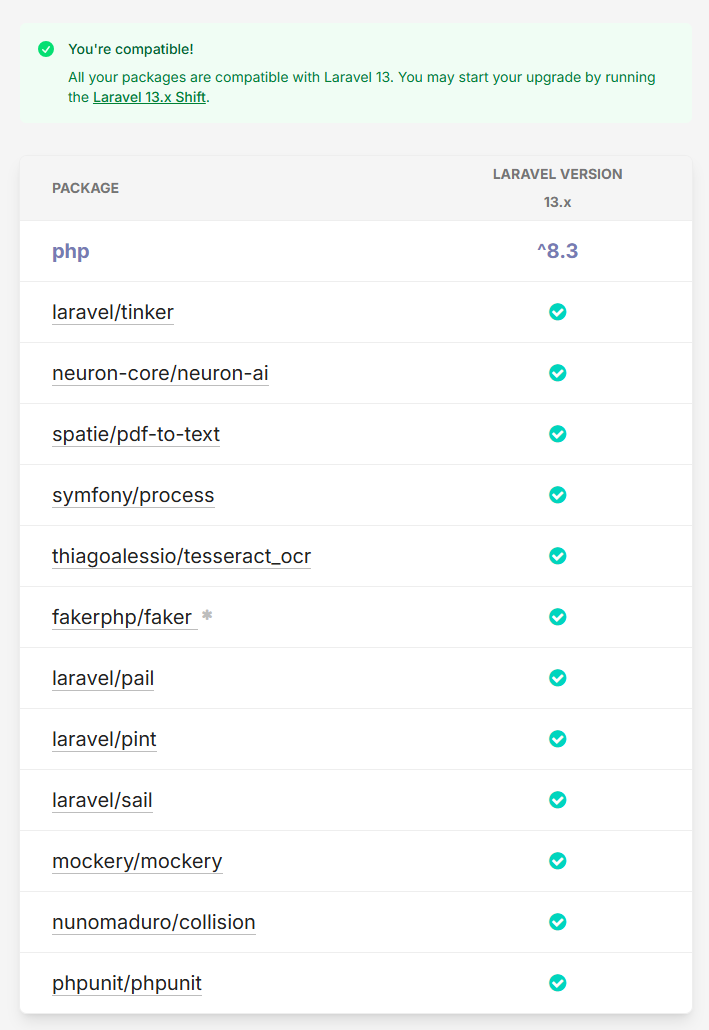
This provides a quick overview of what needs attention before starting the upgrade.
Upgrade to Laravel 13 Using Laravel Boost
Laravel 13 introduces a modern upgrade experience through Laravel Boost, an AI-assisted tool designed to help developers upgrade Laravel applications more efficiently. Instead of manually reviewing every upgrade guide and code change, Laravel Boost can analyze your project and provide guided upgrade assistance.
For many applications, this can significantly reduce the time and effort required to migrate to Laravel 13.
What Is Laravel Boost?
Laravel Boost is an official Laravel package that leverages AI to help developers perform common framework upgrades and development tasks.
When upgrading Laravel applications, Boost can:
- Analyze your existing codebase
- Identify upgrade-related changes
- Suggest code modifications
- Review configuration updates
- Guide developers through framework migrations
This makes it particularly useful for large applications with multiple dependencies and custom implementations.
Install Laravel Boost
Install Boost as a development dependency:
composer require laravel/boost --dev
Once installed, Boost becomes available within supported AI-powered development environments.
Supported Development Tools
Laravel Boost can work alongside several popular AI-assisted coding tools, including:
- Cursor
- Claude Code
- Codex
- Gemini CLI
- GitHub Copilot(VS Code)
- Junie
This allows developers to perform upgrades directly within their preferred development workflow.
Start the Laravel 13 Upgrade
After installing Boost, open your project in a supported AI environment and run the Laravel 13 upgrade command:
/upgrade-laravel-v13
Boost will then analyze your application and provide upgrade recommendations based on Laravel 13 requirements.
What Laravel Boost Can Help With
During the upgrade process, Laravel Boost can assist with a variety of upgrade-related tasks, including updating framework dependencies, reviewing configuration changes, identifying deprecated code, detecting compatibility issues, and suggesting modifications required for Laravel 13. It can also highlight potential breaking changes that may require manual intervention, helping developers navigate the upgrade process more efficiently.
By automating much of the analysis and comparison work, Boost reduces the amount of manual effort typically involved in framework upgrades. This allows teams to focus more on validating business functionality rather than spending time comparing configuration files and upgrade documentation.
Review Changes Before Applying
Although Laravel Boost can significantly streamline the upgrade process, it's important to carefully review all generated changes before applying them to your application. Special attention should be given to areas such as authentication flows, custom middleware, queue processing, third-party package integrations, payment gateways, and API endpoints, as these components often contain application-specific logic.
AI-assisted tools can accelerate upgrades, but they should not replace proper code review and testing. For production applications, always validate changes in a staging environment and run a complete test suite before deploying the upgraded application to production.
Manual Upgrade Steps (Laravel 12 → Laravel 13)
If you prefer full control over the upgrade process or want to understand exactly what changes are being made, you can upgrade Laravel 13 manually. The process primarily involves updating Composer dependencies, reviewing framework changes, clearing caches, and thoroughly testing your application.
Before making any changes, ensure you have completed the prerequisites discussed earlier, including creating backups, committing your code, and verifying package compatibility.
Step 1: Update Your Composer Dependencies
The first step is to update your composer.json file to use Laravel 13 and its related dependencies.
Before
{
	"require": {
	     "php": "^8.2",
	     "laravel/framework": "^12.0"
    }
}
After
{
	"require": {
	    "php": "^8.3",
	    "laravel/framework": "^13.0"
    }
}
Depending on your application, you may also need to update additional Laravel packages and development dependencies to versions compatible with Laravel 13.
For example:
{
	"require-dev": {
		"laravel/boost": "^2.0",
		"laravel/tinker": "^3.0",
		"phpunit/phpunit": "^12.0"
	}
}
Always refer to the package documentation for the latest compatible versions.
Step 2: Update Composer Packages
Once your composer.json file has been updated, run Composer to install the new dependencies.
composer update
If you face dependency conflicts, try:
composer update --with-dependencies
This process will:
- Upgrade Laravel to 13.x
- Update related dependencies
Step 3: Clear All Cached Files
After upgrading dependencies, clear Laravel's cached files to ensure the application loads the latest configuration and routes.
php artisan optimize:clear
This helps prevent issues caused by outdated cached data after the framework upgrade.
Step 4: Test the Application
Make sure everything works as expected:
php artisan serve
Visit http://127.0.0.1:8000 and verify your app’s functionality.
If you use PHPUnit or Pest, run:
php artisan test
Carefully review any failing tests and resolve compatibility issues before moving forward.
Breaking Changes You Should Review
Laravel 13 is designed to provide a relatively smooth upgrade experience for Laravel 12 applications. However, as with any major framework release, there are a few breaking changes and behavioral updates that developers should review before deploying their upgraded applications.
Depending on your application's architecture, some of these changes may require little or no action, while others could impact existing functionality.
Request Forgery Protection (CSRF)
Laravel 13 introduces changes to how CSRF protection is configured and managed internally. Most applications using Laravel's default middleware configuration will continue to work without modification.
However, if your application contains custom CSRF middleware implementations or exclusions, it's worth reviewing your configuration after the upgrade to ensure requests are still being handled correctly.
Cache Serialization Changes
Laravel 13 introduces support for the serializable_classes cache configuration option. This affects how objects are serialized and stored within supported cache drivers.
If your application stores custom objects or complex data structures in cache, review your cache configuration and test any object-based caching workflows after upgrading.
Session & Cache Prefix Behavior
Applications using shared cache stores or multiple Laravel applications on the same infrastructure should review cache prefixes and session cookie configuration.
MySQL DELETE JOIN Behavior
Laravel 13 includes updates related to MySQL DELETE JOIN query behavior.
If your application uses complex delete queries involving joins, review and test those queries carefully after upgrading. While most applications will not be affected, custom query builder implementations may require adjustments.
Pagination Bootstrap Views
Applications using Bootstrap-based pagination templates should verify that pagination views continue to render correctly after upgrading.
If you have customized pagination templates or rely on framework-provided Bootstrap pagination styling, review those views during testing to ensure they remain compatible.
Cache & Optimization Commands After Upgrading
After upgrading to Laravel 13, it's recommended to clear old caches, refresh Composer's autoloader, and rebuild Laravel's optimized files to ensure the application runs with the latest configuration and dependencies.
php artisan optimize:clear
Clear all cached configuration, routes, views, and compiled files.
composer dump-autoload
Regenerate Composer's autoload files after updating dependencies.
php artisan optimize
Rebuild Laravel's optimized caches for better application performance.
These commands help ensure a clean and optimized Laravel 13 environment after the upgrade.
Deploy Laravel 13 to Production
Once you have successfully tested your application and verified that everything is working correctly, you're ready to deploy Laravel 13 to your production environment.
Before deployment, make sure you:
- Push your changes to GitHub, GitLab, or your preferred version control system
- Deploy the updated codebase to your production server
- Install production dependencies
composer install --no-dev --optimize-autoloader
After deployment, monitor your application logs and verify that critical features such as authentication, APIs, queues, scheduled tasks, and third-party integrations are functioning as expected.
Final Step: Verify the Laravel Version
After deployment is complete, verify that your application is running Laravel 13.
Run the following command:
php artisan --version
You should see output similar to:
Laravel Framework 13.x.x